Review
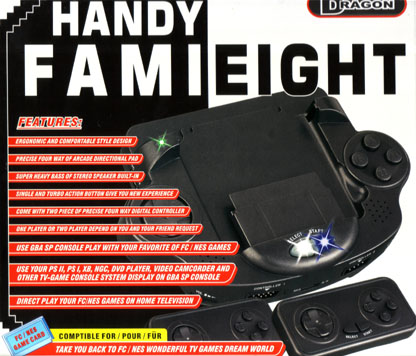
Third party companies love to make peripherals. They can range from practical things like game cases and protective gear to utter crap like useless controller “grips” and, for that matter, most third party controllers themselves. But every now and again something actually good comes out. Where does the Handy FamiEight fit in the realm of third party peripherals? Read on…
Handy FamiEight features:
1. Converts your Gameboy Advance SP into a portable Famicom.
2. Converts your Gameboy Advance SP into a compact Famicom that can be hooked up to a TV with RCA cables.
3. Converts your Gameboy Advance SP screen into a portable television, allowing you to view and play any gaming device that uses RCA AV (yellow, white, red) leads as well as view other AV sources such as DVD players and camcorders.
The system comes new with the following:

1 FamiEight main unit 2 controllers w. turbo buttons 1 Famicom to NES adaptor 1 AV cable 2 sets of instructions; Chinese and pidgin English
Have you ever wished you could use your GBA SP to play your Famicom games? Probably not, but unlicensed company Dragon brings your unspoken wish to life! In addition to serving as a portable Famiclone, the device also can be used as a mounted Famiclone and output the image to a television screen. It also can be connected via AV input ports to import video feed from other AV devices, allowing users to essentially use the GBA screen as a tiny monitor.

The unit itself is well designed. It’s powered by three AAA batteries that seem to last quite a long time. It has two speakers on either side, built in +pad and action buttons as well as turbo buttons. It features two controller 9-pin Atari 2600 style jacks, a volume knob, an NES/AV switch, headphone jack, power switch and even a DC power input the same size and shape as the licensed GBA SP/DS AC adaptor!
The box claims the device is ergonomic and comfortable, and for the most part it is. There are no sudden sharp edges, the device is fairly light (though not “super holy-fuck this is light”) and everything is labeled in English, which is always a help. The device doesn’t look super cheap, and the Start and Select buttons even light up up when touched. Nice.
The only real problem with the design is why Dragon felt the need to integrate their own shitty controls while the GBA SP’s own controls work so well. Instead of controlling the game, the GBA manages screen brightness, hue, saturation, contrast and volume.
The device is built solidly, but as soon as you feel the controllers or the built in controls, you’ll immediately recognize this was made in China. The buttons and the D-pad have that cheap plasticity feel, and for the built in controls, you’ll feel like you need to press every button much harder than you should for it to register as a movement. The included controllers are less static, but they still retain that feeling of cheapness. It’s hard trying to find an alternative controller solution.
Plug a Famicom game into its back and your good to go? Not quite. The GBA needs a small .gba extention file to operate beyond its initial boot-up. This can be accomplished by placing in any GBA game. Once set, the screen can be used. The cart acts as a dummy plug. Use any GBA game you have, FW recommends Ace Combat Advance due to its inherent crappiness.
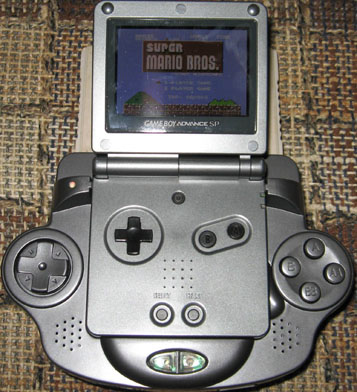
It seems most, if not all, Famicom games work with the Handy FamiEight. The image quality is a bit blurry though. Also, the simple fact that the GBA screen is not as large as the original Famicom’s (FC 256×240 vs. GBA 240×160) means that the image is squashed to fit. This makes reading text and viewing small sprites near impossible and can distort some sprites, which should be expected. It doesn’t really effect gameplay, just something of which to be aware.
Due to cartridge size and bulk, NES play isn’t that much fun. The FamiEight doesn’t work with Castlevania 3 (though it does work with Akumajou Densetsu, oddly enough). The included adaptor is well constructed, though, and NES games fit snug and don’t rattle around like you would think they would.
A neat little feature is that you also can use the FamiEight to display a screen. If you already have at least one other Famicom this feature is pretty useless, but if you’re at a friend’s house or on vacation and want to slip in some Famicom play, this can be a handy feature. Quality of the output is comparable to a real AV Famicom and the device works well. Of course, you have to use those shitty controllers.
As a portable monitor for other videogame systems, the picture quality isn’t perfect, but that’s due more to the cheapness of the GBA’s screen than the fault of the Handy FamiEight. If you’ve seen video on Nintendo’s Play-Yan you know what to expect. This is a neat feature for rooms where you don’t have a TV set up or if you want to play your PS2 in bed.
The Handy FamiEight turned out much better than expected. It can be found on auction sites for around $20 to $30 and comes in your choice of black, dark blue, red, silver, pearl blue or pink.
FamiEight Pros:
Inexpensive. Quality construction and design. Robust, multi-purpose device. Using the GBA screen as a portable TV.
FamiEight Cons:
Controllers are simply terrible. Lacks the Famicom EXT port. Image quality is blurry; screen text unreadable.