
91
Technical & Repair Assistance / Re: Warm CPU, no heat else wea...
Last post by Skawo - July 14, 2025, 03:50:48 amEven with a dead CPU, you should get a gray screen.
No signal would indicate dead PPU, no clock, or no voltage in general.
I'd check your AV mod work, weird that all three boards would show nothing.
No signal would indicate dead PPU, no clock, or no voltage in general.
I'd check your AV mod work, weird that all three boards would show nothing.
92
Technical & Repair Assistance / Warm CPU, no heat else wear, d...
Last post by inabityo - July 13, 2025, 08:20:23 pmI have 3 Famicom motherboards, all of which have no output on the AV mod.
When powered in, the CPU shows a temp of around 55c so not too hot, but no heat elsewhere in the board.
Is it simply dead CPU, anything else we can try? We don't have an oscilloscope. But if reset is low, would that prevent boot?
What can I check without an oscilloscope that might help?
When powered in, the CPU shows a temp of around 55c so not too hot, but no heat elsewhere in the board.
Is it simply dead CPU, anything else we can try? We don't have an oscilloscope. But if reset is low, would that prevent boot?
What can I check without an oscilloscope that might help?
93
Technical & Repair Assistance / Re: Family BASIC Save/Load iss...
Last post by UglyJoe - July 12, 2025, 10:28:51 amEdit: just realized this is a months-old post and you probably figured it out already, lol.
Should be "N101" yeah. Though you can hack in whatever four characters you want
I'm not sure what to add beyond the obvious here. It's either not writing to tape correctly, not reading from tape correctly, or both. The tape data in this case has a two-byte checksum, so it's probably failing once it loads all the data then checks the checksum.
I have a tool online for converting to/from Famicom emulator tape formats and WAV files:
https://hvc7.dev/fbtt/
You could try making a level in an emulator, writing to a virtual tape, use FBTT to convert it to a WAV, then record the WAV to a cassette. Maybe the Famicom could read that?
If you're feeling curious, you could also capture some of your cassette recordings to WAV and run them though FBTT and see what it spits out -- the WAV reading is far from perfect, though, and if the Famicom can't make sense of the recording I doubt FBTT could either.
The modulation parts are the same between Family BASIC and Excitebike, yeah, so if a setup works for Family BASIC then I don't know why it wouldn't work with Excitebike, as well.
Quote from: fcgamer on May 18, 2025, 01:10:04 pmOn my most successful attempts, I received a "Loading / N000" message (from my understanding the bottom part shouldn't be all zeroes), and I also received a read error.
Should be "N101" yeah. Though you can hack in whatever four characters you want
I'm not sure what to add beyond the obvious here. It's either not writing to tape correctly, not reading from tape correctly, or both. The tape data in this case has a two-byte checksum, so it's probably failing once it loads all the data then checks the checksum.
I have a tool online for converting to/from Famicom emulator tape formats and WAV files:
https://hvc7.dev/fbtt/
You could try making a level in an emulator, writing to a virtual tape, use FBTT to convert it to a WAV, then record the WAV to a cassette. Maybe the Famicom could read that?
If you're feeling curious, you could also capture some of your cassette recordings to WAV and run them though FBTT and see what it spits out -- the WAV reading is far from perfect, though, and if the Famicom can't make sense of the recording I doubt FBTT could either.
Quote from: P on May 18, 2025, 02:57:36 pmI think that all of Nintendo's games that supports the tape drive uses more or less the same code for saving/loading as Family BASIC does, so if that works Excitebike also probably works.
The modulation parts are the same between Family BASIC and Excitebike, yeah, so if a setup works for Family BASIC then I don't know why it wouldn't work with Excitebike, as well.
94
Technical & Repair Assistance / Power/AV Boards - Why cutting ...
Last post by Krystman - July 12, 2025, 08:42:56 amI've been replacing the RF Boards on a few Famicoms with new Power/AV boards. I've been looking at some common designs and thinking for building my own from scratch. Here is something I don't quite understand, maybe someone knows what is happening:
I've seen some advanced Power/AV boards do a little trick with the audio signal. Instead of piping the audio from the Famicom straight into the AV connector, they do this sketchy thing where you are supposed to CUT a trace on the Famicom PCB leading into pin 45. And then you are supposed to hook up Pin 46 to the board. And then there is often some other place in the front that needs to bee hooked up (AUX IN?).
Here is an example. This is used together with the Chinese Lava RGB mod
http://www.lava-fc.top/LavaRGBKitInstallOnFamicom.pdf
The NESRGB board does somethings similar
https://etim.net.au/nesrgb/installation-famicom/
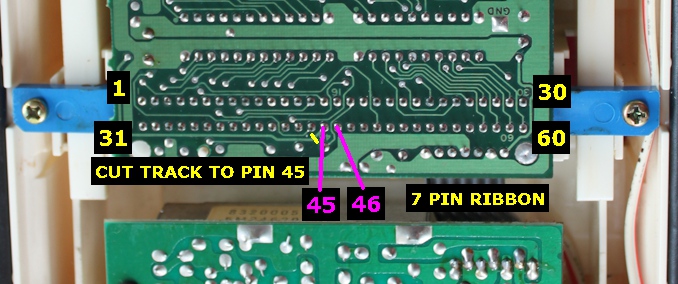
I've also seen at least one other board do something similar.
This seems like a very complicated and destructive procedure. Why is this being done?
I understand that Pin 45 is the audio from the CPU and that is being sent to the cartridge. And then some cartridges have expansion audio which is then being mixed into that and sent out on Pin 46. So when you cut the trace, Pin 46 will only output the expansion audio, right?
So then the AV Board is doing the mixing itself? But why? Is the mixing done inside the cartridge somehow inferior?
Also what is the AUX_IN signal for the Lava RGB mod? It's so far in the front. Is this somehow perhaps related to the microphone on the controller?
I've seen some advanced Power/AV boards do a little trick with the audio signal. Instead of piping the audio from the Famicom straight into the AV connector, they do this sketchy thing where you are supposed to CUT a trace on the Famicom PCB leading into pin 45. And then you are supposed to hook up Pin 46 to the board. And then there is often some other place in the front that needs to bee hooked up (AUX IN?).
Here is an example. This is used together with the Chinese Lava RGB mod
http://www.lava-fc.top/LavaRGBKitInstallOnFamicom.pdf
The NESRGB board does somethings similar
https://etim.net.au/nesrgb/installation-famicom/
I've also seen at least one other board do something similar.
This seems like a very complicated and destructive procedure. Why is this being done?
I understand that Pin 45 is the audio from the CPU and that is being sent to the cartridge. And then some cartridges have expansion audio which is then being mixed into that and sent out on Pin 46. So when you cut the trace, Pin 46 will only output the expansion audio, right?
So then the AV Board is doing the mixing itself? But why? Is the mixing done inside the cartridge somehow inferior?
Also what is the AUX_IN signal for the Lava RGB mod? It's so far in the front. Is this somehow perhaps related to the microphone on the controller?
95
Famicom / Disk System / Re: Game Identification
Last post by portnoyd - July 12, 2025, 07:14:30 amNo
96
Famicom / Disk System / Re: Game Identification
Last post by Jabra - July 12, 2025, 05:34:02 amIs this official ?

97
Technical & Repair Assistance / Re: Hudson's Famicom joystick ...
Last post by Preki - July 06, 2025, 04:17:16 amQuote from: fredJ on July 17, 2024, 05:08:52 amProbably an age thing.Well, I guess so, things age, things need repairs. The question is - is there any way to fix this?
98
Famicom / Disk System / Re: Venus Mini Doctor Copier?
Last post by r.cade - June 25, 2025, 03:59:26 pmQuote from: YoshiFan501 on April 05, 2025, 09:28:47 pmif you run the miniload.fds you can run regular game Doctor images. I would love to get a case for it printed but I don't know where to get one.
I was also looking forward to running some of them on an emulator the test but hopefully someone can find a way to get it to work
NintendulatorNRS will emulation the Mini Doctor, so you can drag and drop directly into it.
99
Buy / Sell / Trade / Re: FC Data Recorder Cassette ...
Last post by P - June 23, 2025, 02:23:42 pmRight, it's just for saving the game progress.
100
Famicom / Disk System / Re: Venus Mini Doctor Copier?
Last post by r.cade - June 22, 2025, 06:11:53 pmI have one of these also, and can vouch that there are 300+ already-hacked images for it you can download, plus with miniload, it will load (some) single sided GD games. It's a neat little device.
If anyone has designed a case, please share!
If anyone has designed a case, please share!